
Esta funcionalidad nos permitirá modificar el identificador de llamada de forma individual, por cada extensión. En caso de no configurar la identificación, se aplicara la identificación general de la centralita.
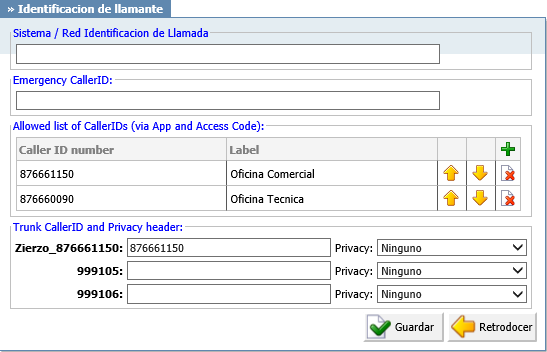
System/Network Caller ID
Information provided here will replace default Caller ID information on the System/Network level. Set this option to ‘JaKe 2007’ and call extension 1005, for example. On the display of the 1005 UAD/Phone, ‘JaKe 2007’ will be displayed as a caller id information on system/network level.
Emergency CallerID:
CallerID entered here will be used only for calls to Emergency Services numbers as set on your PBXware system.
Allowed list of CallerIDs (via App and Access Code)
You can add list of CallerIDs that you would like to allow to be used for outbound calls. This option can be used from gloCOM desktop by simply selecting caller ID number from the list in your gloCOM client. Although, this option is impractical to use on the deskphone itself you can still use it by entering *65*[Caller ID number as entered in the list]*[Number you wish to dial] on your dialpad. If you have a Caller ID number 02033998800 added to this list, and you would like to dial number 0019542788470 using this caller ID you would have to dial *65*02033998800*0019542788470
Trunk CallerID
For each trunk available on the system, there will be a field in which you may set a custom Caller ID that is used when calling over that specific trunk. (ex. John Cricthon)
Privacy
What anonymity to use when setting CallerID on a trunk. If selected option contains Privacy ID that field will be added to SIP header.
- Anonymous – puts «anonymous <anonymous>» in trunk CallerID field, which means that CallerID name and number will be anonymous when dialing out of that trunk.
- Anonymous with Privacy ID – Same as above but adds Privacy ID to SIP header.
- Anonymous with number – Set anonymous CID name but allow showing number.
- Anonymous with number and Privacy ID – Same as above but adds Privacy ID to SIP header.
(Select box)