
Este servicio dirige la llamada a todos los destinos configurados de forma secuencial. Si la llamada no es contestada por ninguna de las extensiones proporcionadas, se transfiere a la extensión «Último destino», que puede ser un Buzón de Voz si se selecciona la opción «Is Voicemail».
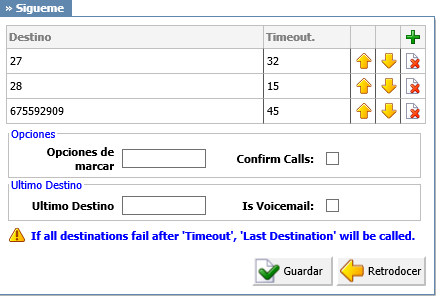
- Destination
- Local/Proper/Mobile numbers to be dialed.
- (ex. 1005, 1006, 1007, 1008)
- ([0-9])
- Timeout
- Ring time in seconds.
- (ex. The time in seconds that destinations will ring. If the call is not answered during this period, it gets transferred to the next priority number).
- ([0-9])
- Dial Options
- Additional call properties.
- (ex. This service can be assigned additional call properties, such as allowing the called party to transfer the call, etc).
- ([a-z])
- Confirm Calls
- With this option enabled you can make sure that the call is answered by a person, not a voicemail. (e.g. If the call is answered by a mobile phone the person picking up the call needs to press 1(or another key on the phone) to answer the phone. If that key is not pressed all phones will keep ringing because call is considered unanswered.)
- (Check box)
- Last Destination
- The last destination number dialed if none of the ‘Priority’ numbers answers the call.
- (ex. Set this field to 1005. If none of the extensions answer, extension 1005 is dialed).
- ([0-9])
- Is Voicemail
- Select whether or not the Last Destination is a Voicemail box.
- (ex. Yes)
- (Check box)
Dial Options:
- t – Allow the called user to transfer the call by hitting #
- T – Allow the calling user to transfer the call by hitting #
- r – Generate a ring tone for the calling party, passing no audio from the called channel(s) until one answers. Use with care and don’t insert this by default into all of your dial statements as you are killing call progress information for the user. You almost certainly do not want to use this. Asterisk will generate ring tones automatically where it is appropriate to do so. ‘r’ makes it go the next step and additionally generate ring tones where it is probably not appropriate to do so.
- R – Indicate ringing to the calling party when the called party indicates ringing, pass no audio until answered. This is available only if you are using kapejod’s bristuff.
- m – Provide Music on Hold to the calling party until the called channel answers. This is mutually exclusive with option ‘r’, obviously. Use m(class) to specify a class for the music on hold.
- o – Restore the Asterisk v1.0 Caller ID behavior (send the original caller’s ID) in Asterisk v1.2 (default: send this extension’s number)
- j – Asterisk 1.2 and later: Jump to priority n+101 if all of the requested channels are busy (just like behavior in Asterisk 1.0.x)
- M (x) – Executes the macro (x) upon connect of the call (i.e. when the called party answers)
- h – Allow the called party to hang up by dialing *
- H – Allow the caller to hang up by dialing *
- C – Reset the CDR (Call Detail Record) for this call. This is like using the NoCDR command
- P (x) – Use the Privacy Manager, using x as the database (x is optional)
- g – When the called party hangs up, exit to execute more commands in the current context.
- G (context^exten^pri) – If the call is answered, transfer both parties to the specified priority; however it seems the calling party is transferred to priority x, and the called party to priority x+1
- A (x) – Play an announcement (x.gsm) to the called party.
- S (n) – Hang up the call n seconds AFTER the called party picks up.
- d: – This flag trumps the ‘H’ flag and intercepts any dtmf while waiting for the call to be answered and returns that value on the spot. This allows you to dial a 1-digit exit extension while waiting for the call to be answered – see also RetryDial
- D(digits) – After the called party answers, send digits as a DTMF stream, then connect the call to the originating channel.
- L (x[:y][:z]) – Limit the call to ‘x’ ms, warning when ‘y’ ms are left, repeated every ‘z’ ms) Only ‘x’ is required, ‘y’ and ‘z’ are optional. The following special variables are optional for limit calls: (pasted from app_dial.c)
- + LIMIT_PLAYAUDIO_CALLER – yes|no (default yes) – Play sounds to the caller.
- + LIMIT_PLAYAUDIO_CALLEE – yes|no – Play sounds to the called party.
- + LIMIT_TIMEOUT_FILE – File to play when time is up.
- + LIMIT_CONNECT_FILE – File to play when the call begins.
- + LIMIT_WARNING_FILE – File to play as warning if ‘y’ is defined. If LIMIT_WARNING_FILE is not defined, then the default behavior is to announce (‘You have [XX minutes] YY seconds’).
- f – forces callerid to be set as the extension of the line making/redirecting the outgoing call. For example, some PSTNs don’t allow callerids from other extensions than the ones that are assigned to you.
- w – Allow the called user to start recording after pressing *1 or what defined in features.conf, requires Set(DYNAMIC_FEATURES=automon)
- W – Allow the calling user to start recording after pressing *1 or what defined in features.conf, requires Set(DYNAMIC_FEATURES=automon)