
Este servicio reenvía las llamadas a otras extensiones dependiendo de la respuesta / estado de la extensión. Por ejemplo, las llamadas se pueden reenviar incondicionalmente a otras extensiones (locales / remotas) o solo si la extensión está ocupada, nadie contesta la llamada o la línea no está disponible
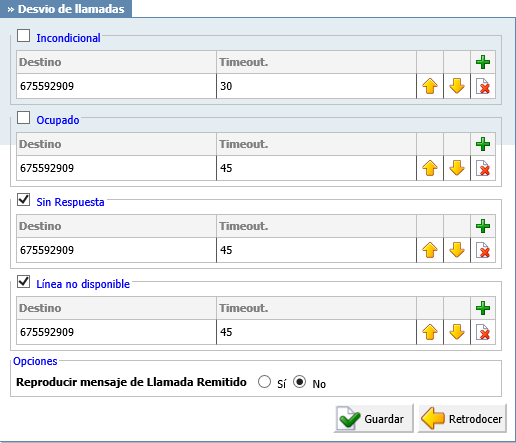
- Unconditional
- Forward all incoming calls.
- (ex. Calls can be forwarded to other extension numbers (Local or Remote) and to local voicemail boxes no matter who is calling. The voicemail box of the current extension is the default Destination Type).
- Busy
- Forward all incoming calls if the extension is busy.
- (ex. Calls can be forwarded to other extension numbers (Local or Remote) and to local voicemail boxes if the line has reached the maximum incoming calls limit. The voicemail box of the current extension is the default Destination Type).
- (Option buttons)
- No Answer
- Forward all incoming calls if the extension doesn’t answer the incoming call.
- (ex. Calls can be forwarded to other extension numbers (Local or Remote) and to local voicemail boxes if no one answers the call. The voicemail box of the current extension is the default Destination Type).
- (Option buttons)
- Line Unavailable
- Forward all incoming calls if the line is unavailable.
- (ex. In case your line gets cut off or for any reason you cannot connect the UAD/Phone to the system, all calls that were supposed to reach you can be redirected to the extension/voice box number set here. The voicemail box of the current extension is the default Destination Type).
- (Option buttons)
- Destinations
- In this field you will enter destinations to which you want to forward current calls depending on your extension’s state. You can enter multiple destinations for each state, but they need to be separated by timeout seconds, meaning that when first extension in the list hasn’t answered in timeout seconds, the next one is ringing and so on.
- (ex. 2222)
- ([0-9])
- Timeout
- Ring time in seconds. After that the current destination will stop ringing.
- (ex. 15)
- ([0-9])
- Play Call Forwarding Message
- Notify users of a transfer being made.
- (ex. If this option is set to ‘Yes’, the caller would hear a ‘Please wait, your call is being forwarded. You’re not being charged for the forwarding part of the call’ message, notifying user that a transfer is being made).
- (Option buttons)
- Allow ES CallerID
- Allows a callee to see the call as if the current extension is making it.
- (ex. If this option is set to ‘Yes’ the callee will see the extension from which call is forwarded, otherwise it will see the original caller).
- (Option buttons)